Sensor Data
Do not poll the API for sensor data frequently, as the device does not report data in real-time. Prefer using webhooks to subscribe to events instead. If you fetch data too frequently, your client will be blocked.
If you must poll for data, use the attribute next_heartbeat_at to determine when the next heartbeat is expected. This is the earliest time at which new sensor data will be available.
Latest Sensor Values
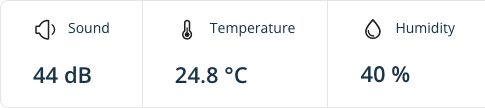
The values seen on the overview section in the webapp and the sensor card in the mobile apps can easily be read from the device object itself. These values are not updated in real-time, instead they're updated any time the device connects to the backend, which happens at least once per hour.
While the regular check-in interval is once per hour, the device will connect immediately if it detects an event.
- Curl
- Typescript
curl --request GET 'https://api.minut.com/v8/devices/DEVICE_ID' \
     --header "Authorization: Bearer ACCESS_TOKEN"
import axios from 'axios';

const response = await axios.get(
  'https://api.minut.com/v8/devices/DEVICE_ID',
  {
    headers: {
      Authorization: `Bearer ${accessToken}`,
    },
  })
const data = response.data.latest_sensor_values;
{
  "device_id": "647846155f4adc639addaa1b",
  ...
  "latest_sensor_values": {
      "temperature": {
          "time": "2023-06-12T13:23:06.000Z",
          "value": 24.815673828125
      },
      "sound": {
          "time": "2023-06-12T13:22:59.000Z",
          "value": 43.774658203125
      },
      "humidity": {
          "time": "2023-06-12T13:23:06.000Z",
          "value": 40.0634765625
      },
      "accelerometer_z": {
          "time": "2023-06-12T13:23:06.000Z",
          "value": 1.015625
      }
  },
}
Historic Sensor Data
- Curl
- Typescript
curl --request GET 'https://api.minut.com/v8/devices/<DEVICE_ID>/sound_level?include_min_max=true&start_at=<START_DATE>&end_at=<END_DATE>&time_resolution=420&null_fill=true' \
      --header "Authorization: Bearer ACCESS_TOKEN"
import axios from 'axios';

const response = await axios.get(
  'https://api.minut.com/v8/devices/<DEVICE_ID>/sound_level?include_min_max=true&start_at=<START_DATE>&end_at=<END_DATE>&time_resolution=420&null_fill=true',
  {
    headers: {
      Authorization: `Bearer ${accessToken}`,
    },
  })
const values = response.data.values;
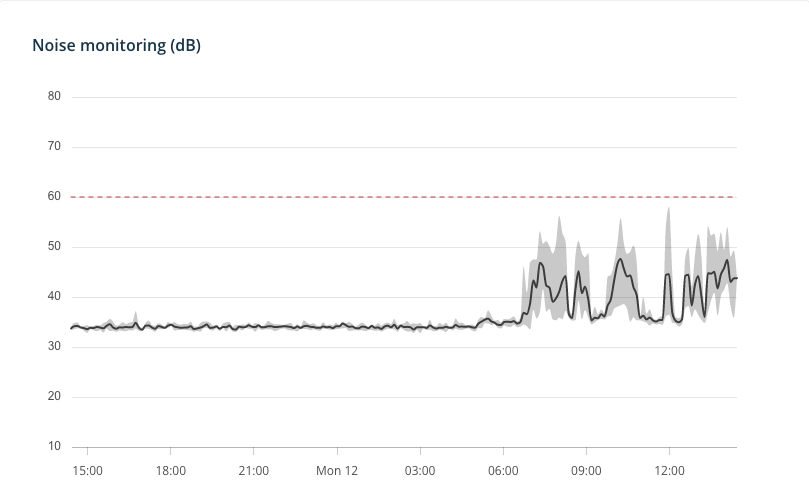
This request uses the sound_level endpoint to fetch historic sound level data. The parameters used in this example are:
include_min_max=true- Include the minimum and maximum values for each time intervalstart_at=<START_DATE>- The start date of the time series, formatted in the date time string format, eg:2023-06-12T13:23:06.000Zend_at=<END_DATE>- The end date of the time series, formatted in the date time string format, eg:2023-06-12T13:23:06.000Ztime_resolution=420- The time resolution of the time series in seconds, eg:420for 7 minutesnull_fill=true- Fill in missing values withnullinstead of omitting them
The response to this request looks like this:
{
    "unit": "",
    "time_resolution": 420,
    "values": [
        {
            "datetime": "2023-06-11T13:24:00.000Z",
            "value": 33.72894287109375,
            "min": 33.3533,
            "max": 34.1046
        },
        {
            "datetime": "2023-06-11T13:31:00.000Z",
            "value": 34.15452357700893,
            "min": 33.5597,
            "max": 34.7948
        },
        ...
    ]
}