Authentication for Partners
Most endpoints in our API requires the user to be authenticated. For this we use OAuth2.
To get started with this you'll need an OAuth client, which you can configure from the web app, by going to the Developer tools page
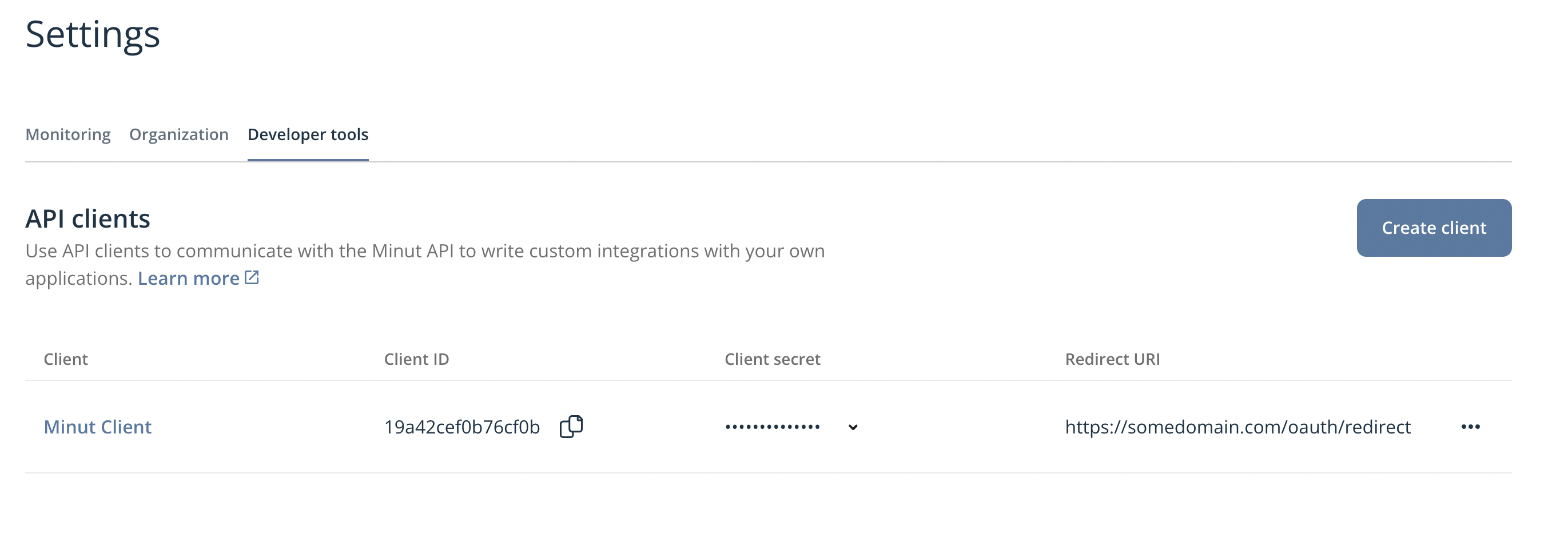
Before making requests you first need to aquire an access token. As you're application should be used by users other than yourself, you'll need to implement the OAuth2 grant type called authorization_code. This is the industry standard for authenticating users in third party applications.
Authorization request
To begin, your application will need to redirect the user to open the Minut authorization url. The url is constructed like this:
https://api.minut.com/v8/oauth/authorize?client_id=<client_id>&redirect_uri=<redirect_uri>&response_type=code
To be clear, you cannot make this request from your backend, the above link should be opened in the users browser.
When the user opens the authorization url, they will be presented with a login screen, and then a consent screen, where they can choose which permissions they want to grant your application.
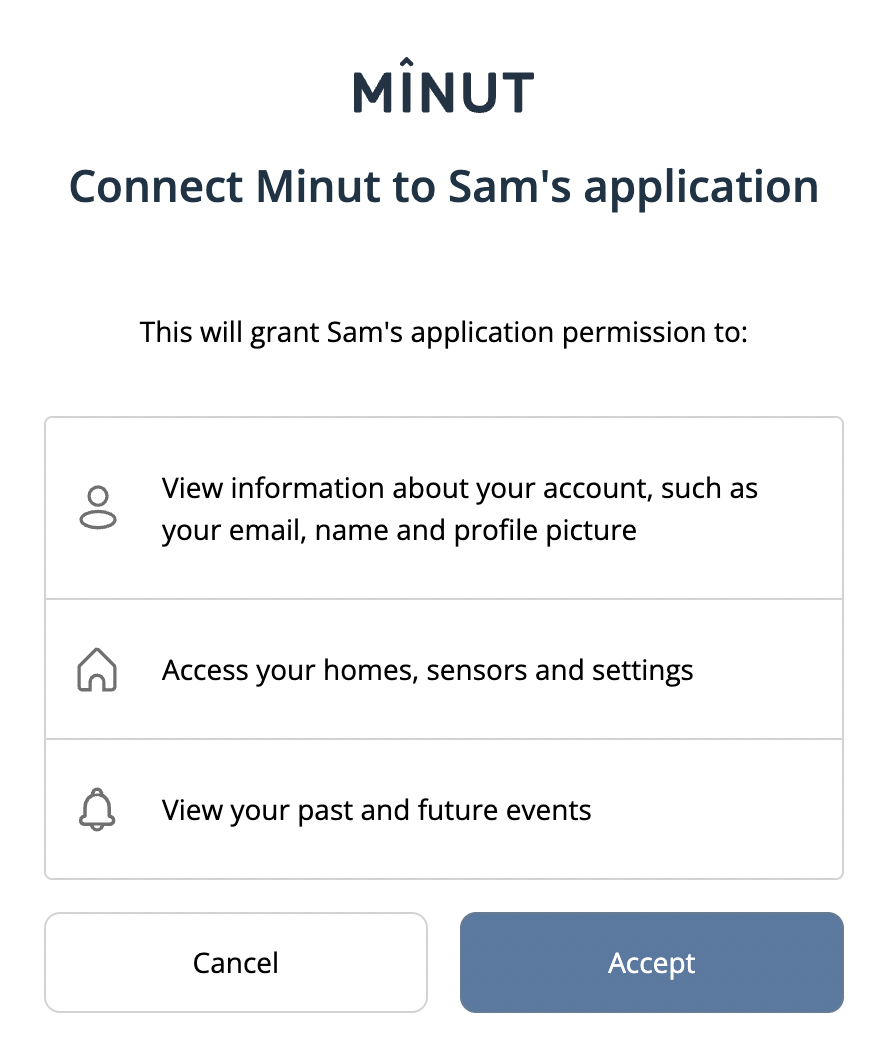
Redirect
If the user selects to grant your application access, they will be redirected to the redirect uri you specified in the authorization url. The redirect uri will have a query parameter called code which you can use to request an access token. For example, if you configured your client with the redirect uri https://example.com/oauth/callback, the user will be redirected to:
https://example.com/oauth/callback?code=<code>
Token request
To get an access token you need to make a request to the /oauth/token endpoint:
- Curl
- Typescript
curl  --request POST 'https://api.minut.com/v8/oauth/token' \
      --header 'Content-Type: application/x-www-form-urlencoded' \
      --data-urlencode 'grant_type=authorization_code' \
      --data-urlencode 'client_id=CLIENT_ID' \
      --data-urlencode 'client_secret=CLIENT_SECRET' \
      --data-urlencode 'code=AUTHORIZATION_CODE' \
      --data-urlencode 'redirect_uri=REDIRECT_URI' \
      --data-urlencode 'response_type=token'
import axios from 'axios';

const headers = {
  'Content-Type': 'application/x-www-form-urlencoded',
}
const body = new URLSearchParams({
  grant_type: 'authorization_code',
  client_id: 'CLIENT_ID',
  client_secret: 'CLIENT_SECRET',
  code: 'AUTHORIZATION_CODE',
  redirect_uri: 'REDIRECT_URI',
  response_type: 'token',
})

const response = await axios.post(
    'https://api.minut.com/v8/oauth/token',
    body,
    { headers },
  )
const accessToken = response.data.access_token;
This will result in a response like this:
{
  "access_token": "eyJ0eXAiOiJKV1QiLCJhbGciOiJIUzI1NiJ9.eyJ1c2VySWQiOiI5ZWM3NmI1Zjk4NTExNGFhYjYyMzQ3MzciLCJyb2xlcyI6WyJjcmVhdGUtdXNlciJdLCJvcmdJZCI6Im1pbnV0Iiwic2NvcGUiOiIiLCJjbGllbnRJZCI6IkxvY2FsRGV2Q2xpZW50IiwiaWF0IjoxNjExNzM2ODI0LCJleHAiOjE2MTE3NDA0MjQsImlzcyI6Ik1pbnV0LCBJbmMuIn0.Vn2jSMV3J12_NHeX_2lPdhZywaF7aGzPKslE172_suA",
  "refresh_token": "def50200d8b1...e3a1",
  "token_type": "Bearer",
  "expires_in": 3600
}
Hold on to both tokens. The access_token is short-lived (expires_in is its lifetime in seconds); the refresh_token is long-lived and is how you obtain new access tokens without sending the user through the consent screen again.
Test your access token
If you want to verify that the token you got worked correctly, you can try out the /users/me endpoint:
- Curl
- Typescript
curl  --request GET 'https://api.minut.com/v8/users/me' \
      --header 'Authorization: Bearer ACCESS_TOKEN'
import axios from 'axios';

const response = await axios.get(
  'https://api.minut.com/v8/users/me',
  {
    headers: {
      Authorization: `Bearer ${accessToken}`,
    },
  },
  )
const user = response.data
and it should return a response similar to this:
{
  "user_id": "cc0904093ce855d4e2a9d224",
  "fullname": "Mr Minut",
  "email": "mrminut@minut.com",
  ...
}
Refreshing the access token
The access token has a limited lifetime. When it expires you'll start receiving 401 Unauthorized responses. Rather than sending the user through the authorization flow again, exchange the refresh_token you stored for a fresh access token using the refresh_token grant:
curl  --request POST 'https://api.minut.com/v8/oauth/token' \
      --header 'Content-Type: application/x-www-form-urlencoded' \
      --data-urlencode 'grant_type=refresh_token' \
      --data-urlencode 'client_id=CLIENT_ID' \
      --data-urlencode 'client_secret=CLIENT_SECRET' \
      --data-urlencode 'refresh_token=REFRESH_TOKEN'
The response has the same shape as the original token response. Store the new refresh_token if one is returned, and schedule the next refresh against expires_in so you renew before the access token actually expires.
Only fall back to the full authorization flow if the refresh token itself has been revoked or has expired.